A founder story · Design & Creative
Pika
Make your screenshots and mockups look beautiful

Online screenshot beautifier and mockup generator. Add backgrounds, device frames, shadows and text to screenshots, then export for social posts, docs and app stores.
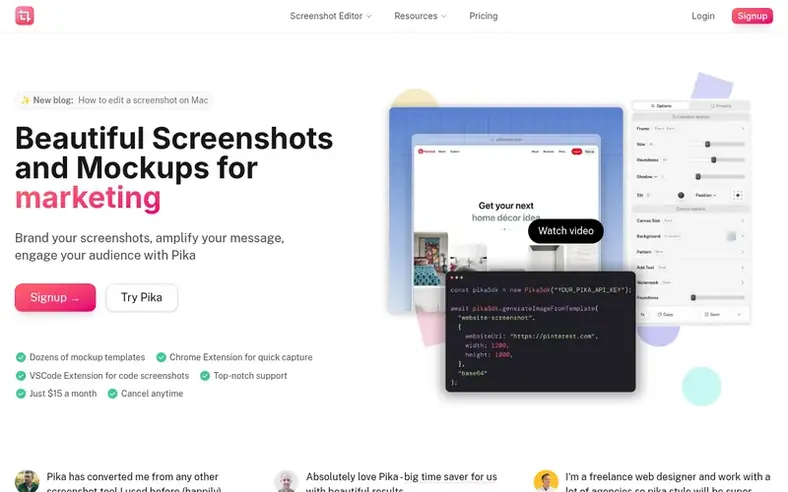
Pika is an online screenshot beautifier and mockup generator where you can add a screenshot to a gradient, color or image background, wrap it in a browser frame or device mockup, adjust padding, roundness and shadow, and export it for social posts, docs, landing pages and app stores.
Make your screenshots and mockups look beautiful
Beyond the screenshot editor, Pika offers templates for tweet images, code screenshots, App Store screenshots, MacBook, iPad and Pixel mockups, testimonial images and Open Graph images. The tool runs in your browser with no installation required, though optional Chrome, macOS, VS Code and Raycast extensions are available for faster capture.
Images are edited and exported in your browser and only uploaded when you choose to create a share link or save a preset, which are Pro features.
Plot points
- Backgrounds: gradients, images and patterns
- Browser and device frames
- Shadows, padding, rounded corners and tilt
- Text, arrows and highlight annotations
- Export as PNG, JPG, WebP or SVG, up to 4K
- Presets to quickly apply styles
Pricing
Free with watermark, or Pro at $15/month ($150/year), Team at $12/seat/month ($120/seat/year from 2 seats), and Lifetime at $299 one-time.
Follow Pika for an email about each milestone, update and new product they post, in a daily summary.
Pika: the metrics
The numbers in this chapter for pika.style: Ahrefs Domain Rating and Majestic link data, with the change since the last chapter.
- Domain Rating
- 47
- −1 (down) since last check
- Trust Flow
- 25
- no change since last check
- Citation Flow
- 38
- no change since last check
- Referring domains
- 574
- no change since last check
- External backlinks
- 4,187
- no change since last check
Ahrefs Domain Rating written up 22 Nov 2026, rewritten 28 Oct 2026. Chapter topic: Recreation/Travel (25). Majestic written up 3 Oct 2026, rewritten 3 Oct 2026. Majestic writes the link data. Trust Flow, Citation Flow and Topical Trust Flow are trademarks of Majestic-12 Ltd.
Pika: where the story is hosted
See where it is hosted
Public RDAP record, last read 19 Nov 2026, 10:02 UTC.
- Domain age
- 4 years
- Registered
- Expires
- Registrar
- Cloudflare, Inc
- DNSSEC
- Not signed
Pika: the story since launch
From 3 October 2026, when Pika went live on Startup Launched, to the latest reading we have.
- Domain Rating (Ahrefs)
- 47 +1 (up) since launch
- 46 at launch (3 Oct 2026), 47 on 21 Nov 2026
- Trust Flow (Majestic)
- 25
- First measured 3 Oct 2026
- Referring domains (Majestic)
- 574
- First measured 3 Oct 2026
Checkpoints
- Day 302 Nov 2026DR 47 +1 (up) since launch0 visits sent
Day 49 since launch. Next receipt: day 60, 2 Dec 2026. What the readings say, nothing more: a rise or fall here is not proof of its cause. We leave out anything we have not measured.
About to launch?
Our free playbook covers what to do before, on and after launch day, plus which launch directories to try.
- Ahead of launch
- Launch day
- Week one
- After launch
Compare and explore
See the alternatives to Pika, Linearity vs Pika, Sketch vs Pika, Balsamiq vs Pika, Milanote vs Pika, more in Design & Creative.
In brief
- What is Pika?
- Pika is an online screenshot beautifier and mockup generator. You add a screenshot, then put it on a gradient, color or image background, wrap it in a browser frame or device mockup, adjust padding, roundness and shadow, and export it for social posts, docs, landing pages and app stores.
- Can Pika take a screenshot of a website for me?
- Yes. You can paste a link into the screenshot editor to capture the page and edit it right away, or use the free website screenshot generator for full-page and mobile captures.
- Do I need to install anything?
- No, Pika runs in your browser. If you want faster capture, there are optional Chrome, macOS, VS Code and Raycast extensions available.
- Are my screenshots uploaded anywhere?
- Your image is edited and exported in your browser. It is only uploaded when you choose to create a share link or save a preset, which are Pro features.
Leave a review for Pika
No chapter of reviews for Pika yet. Write the first. Reviews are free to write and never bought.
Pika has a free listing. The owner can unlock the full profile with a paid launch for $5:
- Founder story (locked)
- Milestones (locked)
- Demo video (locked)
- Dofollow website link: not on this free listing (its website link is nofollow)
 Savee